Pages

Showing posts with label Analytics. Show all posts

Sunday, June 03, 2012

5 Free Useful Twitter tools

Buffer

This is one article that I have been waiting to write for a long time. Since the time I started using Twitter, my list of following/followers have gone quite huge and initially I wondered how can someone manage such a large list. But then, I started using few tools which help me manage my content, recommend tweeps to follow, manage followers and engage. While there are good number of tools available out there and I also keep checking out newer ones like this one --> SeeSaw (am liking it so far), below are the few which I use quite religiously.

1. Hootsuite

Hootsuite in a nutshell is a Social Media management tool. It provides a dashboard which can help you to track Twitter, Facebook, Linkedin accounts, RSS feeds. As far as Twitter is concerned, you can add multiple tabs to view lists or even get updates on a particular hashtag.
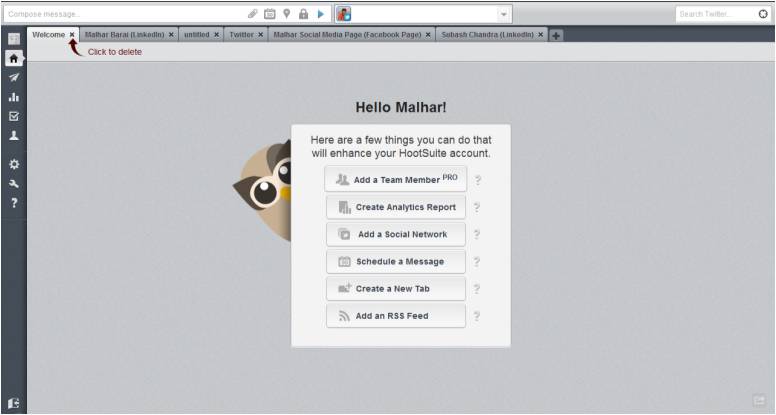
Hootsuite

The reason I chose this app was its ability to provide me a browser based interface which made it easier for me to access from any device, any where & still have the same tabs. In addition to it, it gave me the flexibility to schedule my tweets and also get analytics over the tweets that I had shared. In its PRO version, you can also add 'team members' which allows multiple entities to manage the same account.

2. BufferApp

This is the second tool that I use the most. BufferApp has helped me to share my content anytime of the day & through any device. As it is evident, once you use Twitter more, that there are particular times during the day that your content has the potential to attract higher number of click. BufferApp allows you define such time. Once you had done that, you can simply load your content to its list & they will be delivered during the time you have specified.

Buffer has helped me to automatically post my content at certain times. In fact, I have integrated my buffer account with ifttt & Google Reader. You might want to look at this post by Peter Trapasso to understand how bufferapp can be leveraged along with ifttt & Google Reader.

3. Commun.it

The basic principle of 'social media' is about being 'social'. I had always found it hard to cultivate any relationship over the web which I realised was because of the absence of engagement. I hardly engaged with my audience initially and it was only a one-way street where I just sent out information. Once that error was realised, I tried looking up for tools that will help me engage with my followers and I chanced upon a beta-invite for Commun.it. And, since that day, it has been my de-facto tool to manage my relationships.
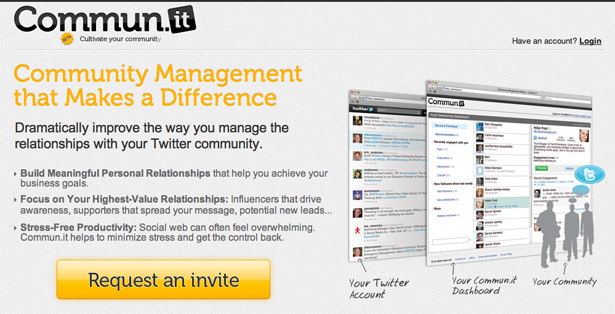
Commun.it

Commun.it has helped me gain insights to my new followers, top engagements & based on your information sharing, it also recommends followers. It's a great tool to help you manage multiple relationship. Go ahead and use it!!!

4. SocialBro

A late entry to the block has been SocialBro. It allows you to manage, generate deep analytics about you Twitter account. The tool is available as a Chrome add-in or it can be downloaded as a desktop app on all the leading OS. 
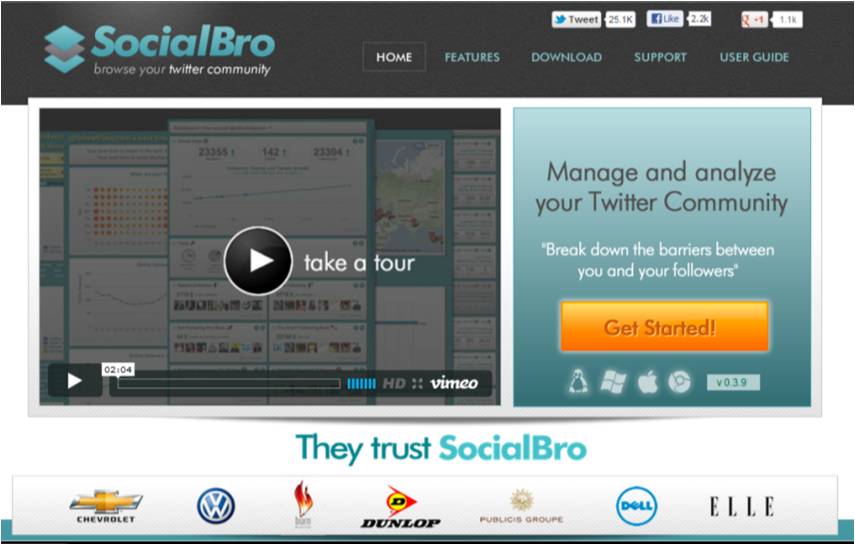
SocialBro

One of the best use of the tool so far has been its ability to integrate the 'Best Time to Tweet' feature with BufferApp. Now I can just run the report & the results gets integrated with BufferApp, allowing me to tweet at times where my message has a better potential to be read.

5. Tweetchat

Ha!!! Now if you are a Twitter Chat addict like me, you need not look beyond 'TweetChat'. You can just specify a hash tag in the search space & you'll start viewing all the tweets which contain that particular hash tag. Login with you Twitter credentials and you can start conversing with tweeple directly from the tool without adding the hash tage (they add it on behalf of you).

TweetChat

I stumbled upon this tool during one of the twitter chat where I was unable to follow the conversation as Hootsuite was too slow and Tweetdeck too fast. In a particulary fast Twitter Chat, TweetChat allowed me to 'pause' the conversation, so I could look back few tweets & respond.

For someone who lives by Social Media, it is very important to bring out the message from the noise. These tools have indeed helped me manage the Twitter universe, since Twitter itself has been proved to be inadquate to provide such option. Hope, you find them equally useful.

Your turn:

What do you have to say about those tools and also let us know what tools you use to manage you daily activities. Looking forward to your comments.

Sunday, February 12, 2012

How-to setup an Editorial Calendar for effective Content Strategy?

Buffer
Image Courtesy Stuart Miles
Writing is a wonderful art & over the time since I started to write - blog, articles, whitepapers or for that matter any content, I have found that the only way to better it, is to follow a certain content strategy. 

Your single most goal is to build content that will generate more traffic but the challenge is how-to translate that into action...
Regardless of your goals, one of the way to setup an effective content strategy that can improve over time, is to build a "Editorial Calendar". I have seen multiple templates available on the web, but having picked up few of them I have gone ahead & personalized it to suit the content that I produce.

An editorial calendar is a great way to do forward planning - research, et al for your content and also helps to keep track of your ideas, users.

Though, one of the goal that every content strategy should address is to show up on the search ranking, so have a post that has a blend of "search engine" specific keywords in title & post.

Here the glimpse my "editorial calendar" and you might want to personalize it to your requirements:

Editorial Calendar

I've divided my calendar under columns like:

Week
As I do my posts on weekly basis, the first column was to put a date/week for each content. It helps me channelize my research, thought process in the run-up to the week.

Key Goal
Its good to define your key goal at the start. It has been my experience that until you have a certain goal in mind, it would be difficult to setup your thoughts over the huge amount of noise generated on the web.

Heading
The first place where the viewer might get interested to go through your content is the "heading". This is the single most piece to attract viewers and gather a certain fan following. Also, the traffic from social channels will most probably be driven by it.

"Headings" need to be creative, suggestive or even controversial so that viewers will read further & comment too.

Have a tentative heading to start with as you might need to revisit after you have defined your keywords.

Keywords
Go through any SEO optimization techniques & the stress is to have maximum coverage of keywords. 

"Keywords" supposedly are instrumental in driving the traffic to your site from the search engines. Make sure your post, heading have a mix of them so that your page is search-engine friendly.

I make sure that my post has a good set of keywords for it to appear in the search engines & help drive first-time visitors.

Hits/Week
Once I am done with posting my content, I track the stats for a week. It helps me to analyze the content of my post - what worked & what didn't. 

A deeper analysis can reveal which channel has generated traffic - search engine, Twitter, Facebook. It is one detail that can helps you to decide which channel to emphasize for your content.

Comments
These is a very personal column that I use to deduce the judgmental errors.
It helps me in planning for my next post & I try to avoid the mistakes that could have occurred in previous posts...

And while you are here, do not forget to leave your comments. They are welcome & helpful too...

Thursday, June 09, 2011

Top 5 Twitter Analytics Tool

Buffer

Here are five analytics tools you need to check out.


5. Klout Among influence-measuring tools, Klout might be the most notorious. I admit it’s not perfect, but there is still a lot we can gather from it. The actual Klout score is pretty much worthless after you surpass 35, but you can gather an awful lot from the Klout score analysis. For instance, it tells you your overall reach and your top influencers and influencees.


4. Backtweets Backtweets is a great free tool to figure out how far your tweets are traveling. It lets you see who is interacting with your tweets.


3. Topsy This isn’t just for Twitter analytics. It’s a real-time social search engine. Topsy is a great way to learn more about trending topics. One of the best features is its advanced search options, which lets you pinpoint all the way down to a specific URL, phrase, or time of day.


2. Advanced Twitter Search Of all the tools on this list, Advanced Twitter Search may be the most underrated. This is the official Twitter search engine. It enables users to aggregate search terms via words, people, places, and dates. Most interesting, it enables you to search tweets based on whether it’s a positive or negative attitude.


1. Tweet Stats This tool will analyze any user's tweets over a given period of time. It breaks down the information into easily digestible bar graphs. It includes number of retweets and mentions, tweet count, tweet density, and overall reach.


Check out my about.me profile!