Pages

Showing posts with label Engagement. Show all posts

Wednesday, June 13, 2012

RebelMouse Reviewed - My First Thoughts

Buffer
We had talked much about RebelMouse in one of the twitter chat few weeks back & had decided to give it a try. Since the guys are still in beta, I had registered and waited for their invitation, which I got it today morning.


As a big lover of social media tools and since it was setup Paul Berry (ex CTO Huffington Post), I pounced upon the opportunity to review it and here are my quick first thoughts:


Pros:
1. Easy registration, just link with your Twitter id
2. Clear interface where you get a visual treat of the twitter, facebook feed
3. Nice dashboard, allowing to link multiple social platforms - Twitter, Facebook
4. Choice of themes
5. Allows to add self-curated content - links, posts, images
6. Image Album creation
7. This is what I liked the most. 'Freezing' content - The ability to highlight content.


Cons:
1. Looks like Twylah look-alike


Verdict: 
Nice to see someone combining the power of Tumblr, Twylah, Scoop.it into one platform. I look forward to using it more often.


Here's my RebelMouse Page if you would like to follow.


In case you haven't heard about them yet, do visit them here. You can also read about Paul Berry's plans for RebelMouse in this interview with Gigaom.


Hope you have got an invite too. Please try and share your views about RebelMouse here & let the team know about it. Also share the link to your RebelMouse Page and I'll follow you.

Check out my about.me profile!

Sunday, June 03, 2012

5 Free Useful Twitter tools

Buffer

This is one article that I have been waiting to write for a long time. Since the time I started using Twitter, my list of following/followers have gone quite huge and initially I wondered how can someone manage such a large list. But then, I started using few tools which help me manage my content, recommend tweeps to follow, manage followers and engage. While there are good number of tools available out there and I also keep checking out newer ones like this one --> SeeSaw (am liking it so far), below are the few which I use quite religiously.

1. Hootsuite

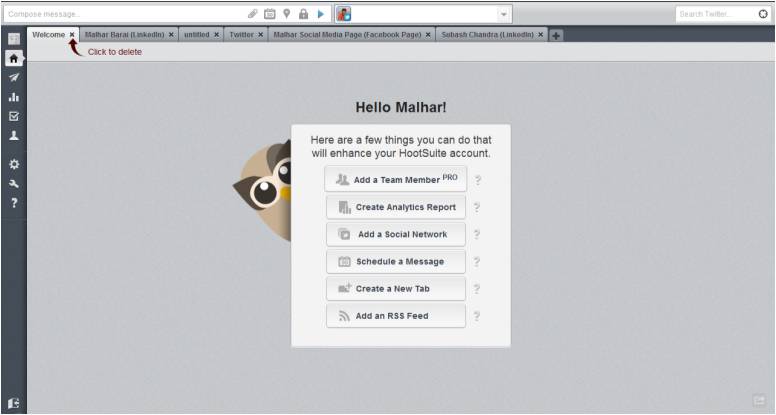
Hootsuite in a nutshell is a Social Media management tool. It provides a dashboard which can help you to track Twitter, Facebook, Linkedin accounts, RSS feeds. As far as Twitter is concerned, you can add multiple tabs to view lists or even get updates on a particular hashtag.

Hootsuite

The reason I chose this app was its ability to provide me a browser based interface which made it easier for me to access from any device, any where & still have the same tabs. In addition to it, it gave me the flexibility to schedule my tweets and also get analytics over the tweets that I had shared. In its PRO version, you can also add 'team members' which allows multiple entities to manage the same account.

2. BufferApp

This is the second tool that I use the most. BufferApp has helped me to share my content anytime of the day & through any device. As it is evident, once you use Twitter more, that there are particular times during the day that your content has the potential to attract higher number of click. BufferApp allows you define such time. Once you had done that, you can simply load your content to its list & they will be delivered during the time you have specified.

Buffer has helped me to automatically post my content at certain times. In fact, I have integrated my buffer account with ifttt & Google Reader. You might want to look at this post by Peter Trapasso to understand how bufferapp can be leveraged along with ifttt & Google Reader.

3. Commun.it

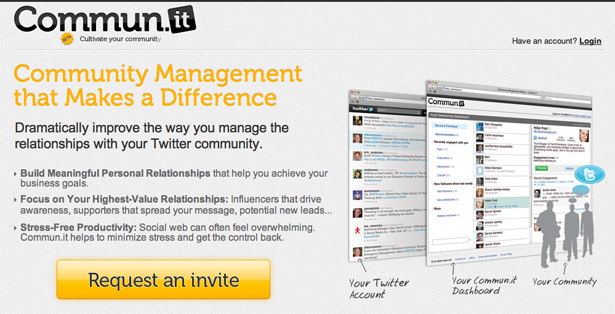
The basic principle of 'social media' is about being 'social'. I had always found it hard to cultivate any relationship over the web which I realised was because of the absence of engagement. I hardly engaged with my audience initially and it was only a one-way street where I just sent out information. Once that error was realised, I tried looking up for tools that will help me engage with my followers and I chanced upon a beta-invite for Commun.it. And, since that day, it has been my de-facto tool to manage my relationships.

Commun.it

Commun.it has helped me gain insights to my new followers, top engagements & based on your information sharing, it also recommends followers. It's a great tool to help you manage multiple relationship. Go ahead and use it!!!

4. SocialBro

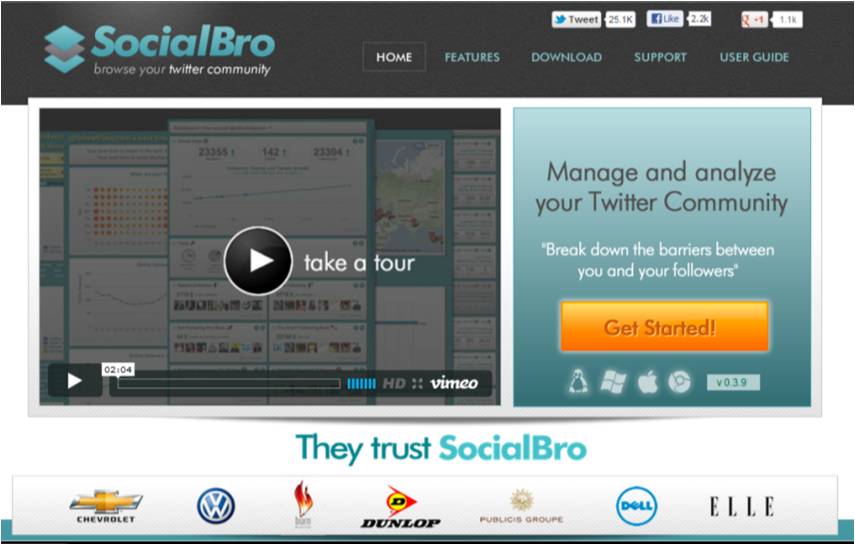
A late entry to the block has been SocialBro. It allows you to manage, generate deep analytics about you Twitter account. The tool is available as a Chrome add-in or it can be downloaded as a desktop app on all the leading OS. 

SocialBro

One of the best use of the tool so far has been its ability to integrate the 'Best Time to Tweet' feature with BufferApp. Now I can just run the report & the results gets integrated with BufferApp, allowing me to tweet at times where my message has a better potential to be read.

5. Tweetchat

Ha!!! Now if you are a Twitter Chat addict like me, you need not look beyond 'TweetChat'. You can just specify a hash tag in the search space & you'll start viewing all the tweets which contain that particular hash tag. Login with you Twitter credentials and you can start conversing with tweeple directly from the tool without adding the hash tage (they add it on behalf of you).

TweetChat

I stumbled upon this tool during one of the twitter chat where I was unable to follow the conversation as Hootsuite was too slow and Tweetdeck too fast. In a particulary fast Twitter Chat, TweetChat allowed me to 'pause' the conversation, so I could look back few tweets & respond.

For someone who lives by Social Media, it is very important to bring out the message from the noise. These tools have indeed helped me manage the Twitter universe, since Twitter itself has been proved to be inadquate to provide such option. Hope, you find them equally useful.

Your turn:

What do you have to say about those tools and also let us know what tools you use to manage you daily activities. Looking forward to your comments.

Sunday, May 13, 2012

Top tips on SEO for your Blog

Buffer
Image Credit - Stuart Miles
SEO or search engine optimization is a way to increase the rankings of your content on the search engines. It helps in generating much required traffic & engagement by having your content getting listed at the top by the various search engines. Content on your blog is no different. It helps to follow certain rules while writing your blog post to have it discovered by search engines & rank it above other blog post. In addition to traffic & helps you generate $$ too.

Last week, over the #blogchat Twitter Chat, we had this interesting topic being discussed. Those 60 minutes were pure pearls of wisdom having Lee Odden (@LeeOdden) co-host it along with Mack Collier (@MackCollier). Guess, it was Lee's second time that he co-hosted #blogchat & this time especially to teach the lesser mortals about optimizing their blogs for search engines and social network. We were indeed thankful to Lee as he was away in Antwerp for a speaking event and it was 3 AM his time we started twitter chat.

Listing down few of the pearls from the event that I helped me learn on optimizing blog in addition to the Content Strategy tips:
  1. Optimization extends beyond keywords & links
  2. Blog SEO is a cycle: Plan, implement, monitor for editor opportunity & progress, measure, refine, repeat.
  3. Write on-topic, on-target - keywords will come up organically.
  4. Write blog content around a keyword.
  5. Ensure you have your keywords in the title & first paragraph
  6. 1-3 keywords for every 100 words
  7. Engage on Social Media - Twitter, Facebook, Google+, Pinterest (it drives 5% as much traffic as Twitter & Google)
  8. Share on Google+, remember they own Google Search
  9. Use "Permalink" on blog so title and keywords show up in URL
  10. Optimize to share, engage. More of each will push your search engine rankings
  11. Dish out Content regularly, ensure you have an editorial calendar

Pitfalls:
  1. Bloggers should be aware that Google is actually penalizing some forms of SEO now.
  2. Overuse of keywords in a post
  3. Search engines, Google or other, understand text - metadata, links and not images.

Tools:
  1. Google Adwords Keyword Tool 
  2. InboundWriter
  3. ScribeSEO

And do follow @LeeOdden & @MackCollier. They did a great job in driving this session.

Do you have any other interesting tip to share on SEO for blog. Share it with us using the comments section below. Would like to hear your tips.


Monday, April 23, 2012

Why Facebook bought Instagram

Buffer
Facebook and Instagram
Facebook’s acquisition of Instagram has come as a big surprise  and the thought that echoed everywhere was ‘Why did it buy Instagram??’, an application which would just cater to sharing photos, using multiple filters, through mobile. With multiple theories going around the blogosphere, the most notable was why would Zuckerburg spend $1 billion on this app just before the IPO.

Here are my thoughts on why Zuckerburg's Facebook picked up Instagram:

1. Kill Competition

It had been rumored that Twitter or Google had expressed interest in buying Instagram & were gathering resources for it. Facebook probably wanted to nip the competition in the bud and snapped it before any of them. The speed at Zuckerburg made the decision, having the negotiations done in a week, lends credibility to the story.

2. Valuation

Instagram, a baby of Kevin Systrom, was until now available on iOS devices & most recently Android to enhace photos, with its multiple filters saw its valuation increasing from about $100 million a year ago to $500 million recently. Similarly, its Android launch saw its user base increasing with almost 5 million downloads in 6 days. So it made sense for Facebook to pick up an commercially successful app just before its IPO & make itself a lucrative investment.

3. Engagement

Facebook had its own challenges in coming up with a mobile based app especially when most of its users like to share photos & messages. Having a mobile based app would have certainly helped them. Compared it to Instagram, it has been the most successful mobile based app to share photos where numerous users engaged over their photos. Facebook could leverage on the multiple filter abilities that Instragram provides & take user experience to a different level. A definite plus for them.

My opinion is that the buying of Instagram should accelerate the growth and engagement on Facebook, which can translate into more ads generating inorganic revenues for Facebook. Either way, it might be hard to justify the $1 billion investment, but it has indeed helped Facebook stump its competitor and by the time they wake up to develop their own capabilities, Facebook might have taken a huge market share.

Do you justify the $1 million payout irrespective of knowing that Facebook had deep pockets?? Share your thought using the comments section below.

Friday, April 06, 2012

Content Strategy - Top 5 Clues

Buffer
Courtesy: nokhoog_buchachon
The letter of the day is 'C' and for the guys in Social Media world, its stands for the dreaded 'Content Strategy'. As marketers & especially in the social media space, tt's the singlemost aspect in deciding the success of content going viral. A good content strategy should ensure that it is easy to be found & engaging.

For the content, that has essentially gone viral, on careful analysis, you might see a pattern. Ape it!!!

Hence, its essential to have a good content strategy at the heart of any campaigns so that you gather enough leads. Here are my top 5 clues to help you ace content strategy:

1. Define niche
Identify an area of expertise to talk about. Reader's come to your blog to learn something, but if cannot offer learning on the same subject over your posts, chances are, they are not coming back. Capture the trends in your domain & write about it, you'll always have the first-mover advantage.

2. Determine Audience
Based on the post you have written & the traffic that has been generate, analyze your audience. You should be able to know which part of the world reads more, shares more. Target this audience by ensuring that your post covers what they want.
 
3. Curate Relevant Content
It would be a difficult task to think about content day in & day out. So better curate content. Internet is flooded with noise, determine what you want. I use channels like Google Reader, Scoop.it to curate content for my blog.

4. Include Call-to-actions (CTA)
One of the most important aspect of any content strategy is to have a CTA. You need to be able to get the reader on what to do next after visiting your content. Asking them for opinion, to share or even getting them to download your ebook are good CTAs.

5. Social Sharing
The last one though has to be about sharing. Give your reader multiple opportunities to share your content. Pick up any one of the plug-in available over the web & have it on your page. Make it easy for the reader to share your content.

This are some of the tips that I have gathered by experience & am trying to master it.

My CTA for you is to share it, as I have put multiple social sharing links (Twitter, Facebook, Google+, Stumbleupon, Buffer.it). You can also share your opinion using the comments section below.

Check out my about.me profile!